 Q3
Q3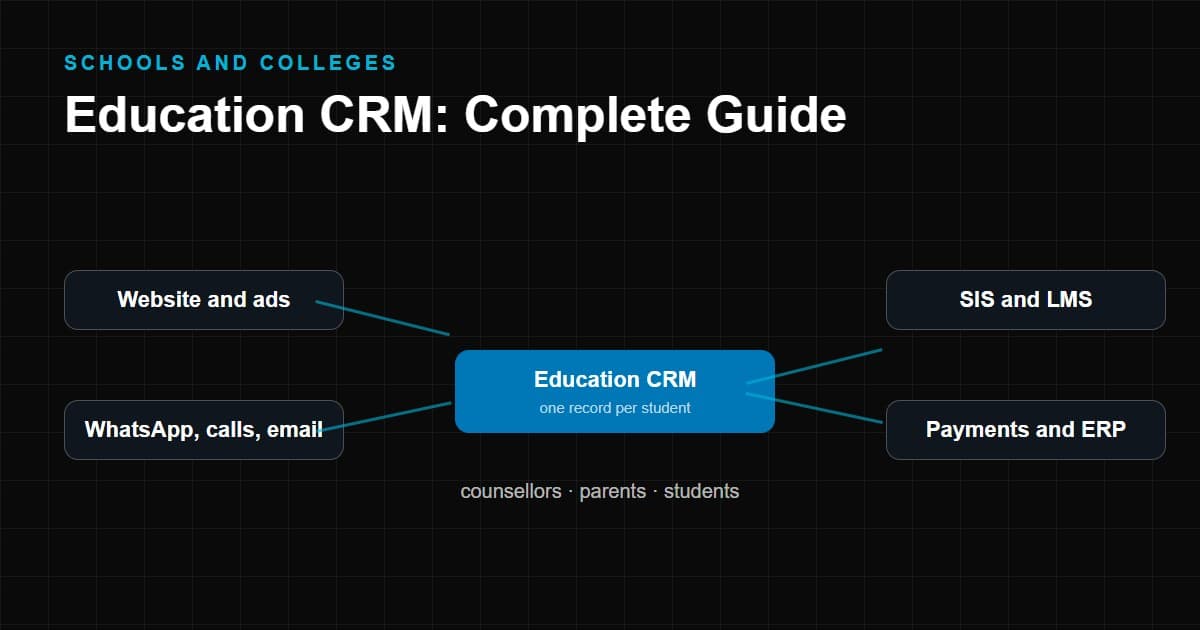
An education CRM is a customer relationship management system built around the way educational institutions find, advise, admit and keep students. Where a general business CRM is organised around deals and accounts, an education CRM is organised around inquiries, programmes, applications, counsellors, intakes and enrollment.
If you are comparing education CRM software for a school, college, university, coaching centre or online academy, this guide gives you the map: what the category is, how it differs from neighbouring systems, which features matter and how to choose without relying on a ranking list. Deeper guidance for specific cases is in our articles on CRM for private schools, CRM for online teaching institutes and custom CRM vs ready-made CRM.
What Is an Education CRM?
An education CRM manages the relationship between an institution and the people it recruits and serves, mainly prospective students and their parents or guardians. It keeps one record for each person, logs every interaction, tracks them through admission stages and reminds staff what to do next.
In practical terms, an education CRM helps an admissions team answer:
- Who inquired, when and through which channel?
- Who is responsible for the next contact?
- Which stage is each applicant in?
- What has been said to them already?
- Which sources and counsellors produce enrollments?
Two related terms are worth clarifying. Admissions CRM and student recruitment CRM usually refer to the same core function, focused on the stages before enrollment. Student lifecycle management extends the same record past enrollment into retention, re-enrollment and alumni relations, though not every product covers the later stages.
Education CRM vs Traditional CRM
A traditional CRM can be configured to manage admissions, and many institutions do exactly that. The difference is what you get on day one and what you must build yourself.
| Aspect | Traditional business CRM | Education CRM |
|---|---|---|
| Central concept | Lead → opportunity → deal | Inquiry → applicant → admitted student |
| The person | A buyer | A student, often with a parent or guardian involved |
| Time frame | Sales cycle | Admission cycle, intakes and academic calendar |
| Product being sold | Goods or services | Programmes, courses, grades or batches with capacity |
| Common stages | Qualified, proposal, negotiation, closed | Counselled, applied, offered, accepted, enrolled |
| Extra data | Company, deal value | Grade or programme, previous qualification, documents, guardian |
| Staff role | Sales representative | Admissions counsellor or officer |
| Reporting | Pipeline value, win rate | Applications by stage, seats filled, source-to-enrollment |
| Configuration effort | Often heavy for admissions | Lower for standard admissions workflows |
A traditional CRM is a good choice when your admissions process is simple, you already use the platform elsewhere, or you need broad flexibility. An education CRM saves setup when your process follows the standard admission pattern. Neither is better in the abstract.
Why Schools and Colleges Use Education CRM
The reasons differ from a general "why CRM" argument, because the problem is specific. Institutions typically adopt an education CRM to solve issues such as:
- A seasonal surge. Inquiries cluster before admission deadlines, and the team must respond well when volume is highest.
- Multiple owners. Front office, counsellors, faculty and management all touch a prospective student. Someone needs to see the whole conversation.
- Long consideration. Families take weeks or months to decide, so the institution needs sustained, timely contact rather than one call.
- Capacity limits. Seats per programme or grade are finite, so admissions must balance demand and capacity.
- Accountability. Management needs to see whether marketing and counselling produce admissions.
- Data continuity. Staff change; the record of relationships should stay with the institution.
Education CRM Features
Twenty capabilities show up repeatedly in education CRM software. They are grouped here by the job they do, along with what each should let you do.
Attract and capture
- Lead capture. Bring inquiries from web forms, landing pages, ads, events, calls and messaging into the system automatically, with the source recorded.
- Inquiry management. Give each inquiry a status, an owner and a due action, with a shared view of unassigned or overdue items.
- Data import. Load existing spreadsheets and lists with field mapping and error reporting.
- Duplicate detection. Identify repeated records by phone, email or name, and merge them without losing history.
Advise and convert
- Admission pipeline. Model your own stages, from inquiry to enrolled, and see each applicant's position and time in stage.
- Student recruitment. Support outreach programmes such as school visits, fairs and campaigns, and track their results.
- Counsellor management. Assign leads, balance workloads, and view each counsellor's tasks and outcomes.
- Follow-up automation. Create tasks, reminders and sequences triggered by stage changes or inactivity.
- Application management. Track applications, documents, tests, interviews and decisions against a checklist.
Communicate
- Communication management. Keep a single timeline of conversations with the prospective student and guardian.
- Call management. Log calls, outcomes and next steps, with click-to-call or recording where the integration supports it and local rules allow.
- Email. Send templates and individual messages from the record and log replies.
- WhatsApp where supported. Use approved business messaging, following the provider's consent and template rules. Support differs between vendors.
Enroll and retain
- Student records. Keep applicant and student details, documents and history in one profile.
- Enrollment tracking. Show who has been offered, accepted, paid and enrolled, and what remains outstanding.
- Payment tracking. Track application fees, deposits and instalments, natively or via connected payment systems.
Measure and govern
- Reports and dashboards. Funnel, source, counsellor and intake views that management can read without technical help.
- Analytics. Trends over cycles, drop-off analysis, source-to-enrollment performance and forecasting where supported.
- Integrations. Connectors or interfaces for your website, ad platforms, LMS, SIS, ERP, payment provider and messaging services.
- Role-based access. Control who can view or edit which data, by role, campus or department, with audit history.
No institution needs all twenty on day one. The list is a menu for building a requirements checklist, not a scorecard to maximize.
Education CRM Admission Workflow
A typical admission workflow inside an education CRM looks like this.
Lead → Qualification → Counselling → Application → Follow-up → Admission → Payment → Enrollment
- Lead. A prospective student is captured with contact details, programme of interest and source.
- Qualification. The team checks basic fit: eligibility, timing, location, budget and interest. Some institutions use scoring; others use a short checklist.
- Counselling. A counsellor explains programmes, answers questions and records the student's goals and concerns.
- Application. The student applies. Documents, tests and interviews are tracked against the record.
- Follow-up. Between each milestone, reminders keep the applicant moving and catch those who stall.
- Admission. The institution decides and offers a place. The applicant accepts or declines, and the reason is recorded either way.
- Payment. Fees or deposits are collected and tracked.
- Enrollment. The student is confirmed and, if applicable, handed to the SIS, LMS or school management system.
The specific stages differ. A university may include entrance exams and scholarships. A coaching institute may add demo classes. A school may add a campus visit. A good education CRM lets you adapt the stages without code.
Benefits of Education CRM
Claims about specific percentage improvements depend on the institution and are best measured in your own data. What a CRM demonstrably changes are the mechanisms behind enrollment.
- Fewer inquiries lost. Every contact has an owner and a due action.
- Faster response. Automated acknowledgement and assignment shorten the wait.
- Better conversations. Counsellors see the history before they call.
- Consistent follow-up. Sequences and reminders keep prospects moving at the right pace.
- Clearer forecasting. Pipeline data shows likely intake before the deadline.
- Accountable marketing. Source tracking shows which channels contribute admissions.
- Continuity. Institutional memory survives staff changes.
- Less duplicate effort. Shared records prevent double contact and retyping.
- Better decisions. Reasons for declined offers reveal issues in price, timing or programme fit.
- Stronger data governance. Access controls and audit history are easier in one system than in many spreadsheets.
Education CRM for Different Institutions
The core concept is shared, but priorities differ.
Schools
Admissions focus on grade-level intake, parent engagement, campus visits and seat capacity. Sibling and existing-family relationships matter. See CRM for private schools for a detailed walk-through.
Colleges
Recruitment involves programmes, prior qualifications, application documents and counsellor outreach, often to feeder schools. Scholarship and financial aid conversations may be part of the process.
Universities
Larger scale, multiple faculties, international applicants, agents and complex application requirements. Integrations with the SIS and enterprise systems are usually central, and governance across departments matters.
Coaching institutes
Shorter cycles, batch and schedule selection, demo classes and rapid follow-up. Lead volume can be high around exam seasons.
Training institutes
Often serve working adults and corporate clients as well as individuals. Course scheduling, certifications and employer-sponsored enrollments may need to be modelled.
Online teaching institutes
Ad-driven lead flow, WhatsApp-heavy communication, payment links and platform access. Attribution and speed-to-lead dominate. See CRM for online teaching institutes.
EdTech businesses
Combine product sales with learner acquisition. They may need trial-to-paid workflows, product usage data and integration with a proprietary platform. Some will reach the point where a custom build is worth considering; see custom CRM development for that decision.
How to Choose the Best Education CRM
There is no single best education CRM. The best fit depends on your institution, process and budget. Rather than trusting a universal ranking, evaluate options against a consistent framework.
| Criterion | What to assess |
|---|---|
| Institution size | Number of students, programmes and staff the system must serve |
| Number of leads | Peak and average monthly inquiries; performance under load |
| Admissions team | Size, roles, shift patterns, remote or on-campus work |
| Number of campuses | Need for campus-level permissions, routing and reporting |
| Communication channels | Phone, email, SMS, WhatsApp, chat; which are natively supported |
| Automation | Assignment rules, sequences, stage triggers; how easily you can change them |
| Integrations | Website, ad platforms, LMS, SIS, ERP, payment gateway; connectors vs open interface |
| Reporting | Ready reports, custom report builder, exports, dashboards |
| Data security | Hosting location, encryption, access control, audit logs, backups, data export |
| User roles | Granularity of permissions and ease of administration |
| Implementation | Migration support, configuration effort, training, time to first use |
| Support | Channels, hours, languages, response commitments |
| Scalability | Ability to grow users, records and campuses without re-platforming |
| Total cost of ownership | Licences, per-user fees, setup, integrations, messaging and telephony costs, support, staff time |
Types of product to compare. Rather than a list of brands whose features and pricing change frequently, think in categories:
- General-purpose CRM platforms that you configure for admissions. Flexible and widely integrated; more setup for education-specific stages.
- Education-specific CRMs designed around inquiries, applications and enrollment. Faster to start for standard admissions; flexibility varies.
- Enterprise platforms with education offerings, typically suited to large institutions with complex requirements and dedicated administrators.
- CRM modules from SIS or ERP vendors, which reduce integration effort if you already use that vendor, at the price of coupling.
- Custom-built systems, appropriate where workflows or data control needs are unusual.
When you shortlist named products, check the vendor's current documentation, pricing pages and independent reviews yourself. Pricing, packaging and features change often, and published ratings depend on who submitted them and when.
A practical selection process:
- Write your admission workflow and requirements, and mark each as essential, useful or optional.
- Shortlist three or four products across at least two categories.
- Give each vendor the same scenario scripts to demonstrate, using your own data shapes.
- Ask the counsellors who will use the system to test it.
- Verify integrations by asking for a live demonstration, not a feature list.
- Estimate total cost over three years.
- Check references from institutions similar to yours.
- Run a pilot with one team or campus before rolling out fully.
Education CRM vs School Management System
A school management system (also called a school ERP or administration system) runs the internal operation of an enrolled school: attendance, timetables, grades, fees, staff, and parent portal. An education CRM manages the pre-enrollment relationship: inquiries, counselling, applications and offers.
| Question | Education CRM | School management system |
|---|---|---|
| Main users | Admissions and marketing teams | Teachers, administrators, accounts |
| Main record | Prospective student and guardian | Enrolled student |
| Time focus | Before and around admission | During the student's time at school |
| Typical data | Source, counselling notes, application status | Attendance, grades, timetable, fee ledger |
| Success measure | Inquiries converted to enrollments | Operational efficiency and reporting |
| Integration point | Passes confirmed students onward | Receives enrolled student data |
Many schools need both. Where they are separate systems, the handover at enrollment is worth specifying carefully to avoid retyping and mismatched data.
Education CRM vs Student Information System
A student information system (SIS) is the system of record for enrolled students, their academic history, enrollment status, grades and official records. In higher education, it is often the central institutional database.
An education CRM sits upstream. It manages the relationship until the student is enrolled, then may continue engaging with them for retention and alumni relations. The two should exchange data: applicants become students in the SIS; enrollment status flows back to the CRM.
| Question | Education CRM | SIS |
|---|---|---|
| Purpose | Recruit, communicate and convert | Record and manage the academic relationship |
| Data owner | Admissions and marketing | Registrar and academic administration |
| Person types | Prospects, applicants, sometimes alumni | Enrolled students and alumni |
| Flexibility | High, configured for outreach | Structured for official records and compliance |
| Typical link | Sends accepted applicants | Sends enrollment and status updates |
Some vendors offer both under one platform; others integrate separate products. Neither approach is automatically better. Ask how the data is shared and who owns each data set.
Education CRM vs Generic CRM
This comparison is a common source of confusion because a generic CRM can be made to work for education. The question is how much effort that takes for your situation.
| Question | Generic CRM | Education CRM |
|---|---|---|
| Ready-made admission stages | No, must be configured | Typically included and editable |
| Applicant and guardian relationships | Requires custom setup | Usually modelled |
| Programme, grade and intake fields | Custom fields required | Typically included |
| Application and document tracking | Custom objects or add-ons | Often built in |
| Integration with education tools | Depends on connectors | Often more focused |
| Breadth beyond admissions | Wider ecosystem, many use cases | Narrower and deeper |
| Terminology | Deals, accounts, opportunities | Applicants, programmes, counsellors |
| Cost of ownership | Licence plus configuration effort | Licence plus configuration, often less |
| Best suited to | Institutions with unusual processes or existing platform investment | Institutions with standard admission processes |
If your team already uses a generic platform and has capable administrators, configuring it may be efficient. If you have no CRM and a standard admission cycle, an education-specific product often reaches usefulness sooner. And if neither fits your workflow, that is the situation where the custom CRM vs ready-made CRM question becomes relevant.
Education CRM Implementation Checklist
Plan
- Document the admission process for each programme or grade.
- Identify goals, such as faster response, cleaner data or clearer reporting.
- Name an internal owner and a project sponsor.
- Define what "enrolled", "qualified" and "lost" mean.
Prepare data
- Gather existing lists from spreadsheets, forms and other systems.
- Remove duplicates, standardize names, phone formats and programme names.
- Decide which historical records to migrate and which to archive.
- Review consent status for contacts.
Configure
- Set up stages, fields, roles and assignment rules.
- Create templates for common communications.
- Configure automations for acknowledgement, reminders and follow-up.
- Build the dashboards management will use.
Integrate
- Connect website forms and landing pages.
- Connect ad platforms and messaging services as needed.
- Define the handover to your SIS, LMS or ERP.
- Test each integration with sample records.
Train and launch
- Train each role on tasks they perform daily.
- Launch to a pilot group first if you have multiple teams.
- Set expectations for response times and record keeping.
- Retire old tracking sheets as the system of record.
Review
- Review usage and data quality weekly in the first cycle.
- Collect staff feedback and fix friction quickly.
- Compare key metrics with your baseline after a full cycle.
- Reassess integrations, permissions and reports at least annually.
Common Mistakes When Choosing Education CRM Software
- Starting with features instead of process. Define the workflow first.
- Choosing by a ranking or a rating alone. Ratings reflect other buyers' circumstances.
- Underestimating integration effort. The CRM's value grows with the quality of its connections.
- Paying for capacity you will not use. Start with what you need, and confirm you can add later.
- Ignoring total cost of ownership. Per-user fees, messaging costs, services and staff time add up.
- Skipping the pilot. A small live test reveals more than a demonstration.
- Neglecting data quality. Migrating messy data produces messy reports.
- Forgetting data protection. Student data, especially about minors, brings legal duties that vary by country. FERPA in the United States, GDPR in Europe and the UK, and India's Digital Personal Data Protection Act are examples of frameworks that may apply, depending on where you and your students are. Ask qualified advisers about your obligations.
- No adoption plan. A system nobody uses is expensive.
- Locking in without an exit. Confirm you can export your data in a usable format.
Conclusion
An education CRM earns its place when it gives an admissions team one reliable record of every prospective student, a clear pipeline and consistent follow-up. The best education CRM for you depends on your institution type, admission workflow, integrations and budget, not on a universal ranking. Compare generic, education-specific and custom options honestly, test the leading candidates with your own scenarios, and implement in stages. Start with the process, choose the tool second, and measure results against your own baseline.