 Q3
Q3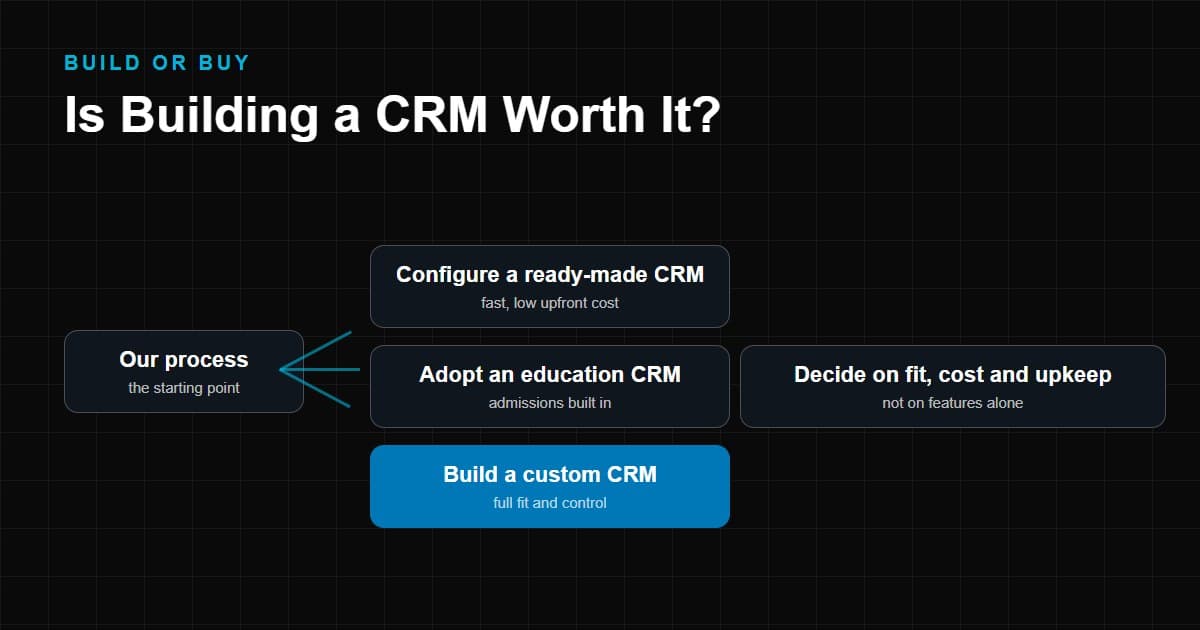
Most businesses that ask whether to build a CRM are not really asking about software. They are asking whether their way of working is different enough from everyone else's to justify owning a system built around it.
Sometimes it is. A custom CRM can fit an unusual process exactly, connect cleanly to the systems you already run, and give you full control over your data. It can also become a slow, expensive project that ends up doing what an off-the-shelf tool would have done in a month.
This guide is written to help you decide, not to sell you either answer. It covers what building a CRM involves, when a custom CRM is justified, where it goes wrong, what drives the cost, how long it takes, and how education businesses should think about the choice. It ends with a practical framework you can apply to your own situation.
What Does Building a CRM Actually Mean?
"Building a CRM" covers three quite different things, and mixing them up is the source of most bad estimates.
- Configuring an existing CRM. You keep a standard product and change fields, pipelines, permissions and automations. No software is written. This is often all that is needed.
- Extending an existing CRM. You add custom objects, scripts, plug-ins or integrations on top of a vendor platform. Some code is written, but the vendor still runs the core.
- Custom CRM development. A development team designs and builds the application: database, screens, business logic, user permissions, reporting and integrations. You own the code and, usually, the hosting and maintenance.
When people search for custom CRM development, they usually mean the third option. The first two are worth exhausting before you commit to it.
A custom CRM also is not one thing. At minimum it stores contacts and interactions, tracks people through stages of a process, assigns work to staff and reports on what is happening. Around that core sit modules such as communication, payments, documents, automation and analytics. Each module you add changes the size of the project.
When Does Building a Custom CRM Make Sense?
Building tends to be justified when the shape of your business is the problem, not the price of software. These are the situations where it most often holds up.
1. Your workflow is highly specialized
If your process has stages, approvals or data relationships that do not resemble a standard sales pipeline, you may spend more effort bending a generic tool than you would building the right one. Examples include multi-party approval chains, records that link people to cases, courses, properties or devices in complex ways, or processes governed by regulation.
2. Existing CRMs do not fit your process, even after configuration
The test is important: after configuration and reasonable extension. Before deciding a product does not fit, check whether custom fields, custom objects, workflow rules and integrations close the gap. If the gap is still large and it sits in your core process, that is a real signal.
3. You need custom integrations
CRMs rarely work alone. If you need two-way sync with an internal system, a legacy database, a learning platform or a payment provider that standard connectors do not cover, integration work may dominate the project. In that case it can be cleaner to design the CRM and the integrations together.
4. You need full control over your data
Some organizations need to decide exactly where data is hosted, who can access it and how long it is retained. That may be driven by regulation, by contracts with clients, or by policy on children's data. Vendor CRMs offer controls, but they are the vendor's controls. A custom build lets you set your own, at the price of carrying the responsibility.
5. You have long-term product plans
If the CRM is intended to become part of a product you sell, or the core system a growing business will run on for many years, ownership and roadmap control carry real value. If it is only an internal tool for the next two years, that value is smaller.
6. You need industry-specific workflows
Some sectors have workflows that generic CRMs handle poorly. Admissions is a good example, and we return to it below. But "industry-specific" does not automatically mean "build". Many industries already have ready-made specialist CRMs, which is a third option between generic and custom.
When Building a CRM May Not Be the Right Choice
A custom build is often the wrong call for reasons unrelated to how good the idea is.
1. You need a CRM quickly
A ready-made CRM can be running in days or weeks. A custom system needs discovery, design, development and testing before anyone can use it. If you are losing leads today because nothing is tracking them, waiting for a build is itself a cost.
2. Your budget is limited
Custom development requires spend before it produces value, and it needs a budget for the years after launch. If you cannot fund both, a subscription product is usually the safer path.
3. Your workflow is standard
If your process is "capture a lead, follow up, close, and report", the market has solved this many times over. Building it again gains you little.
4. You don't have technical resources
A custom CRM needs someone who can specify requirements, review work and make decisions, on your side as well as the developer's. Without an internal owner, projects drift.
5. You don't want ongoing maintenance
Software is not finished at launch. Security updates, bug fixes, dependency upgrades, hosting, backups, new requests and staff turnover all continue. A subscription CRM absorbs much of this into the fee. A custom CRM turns it into your responsibility.
Custom CRM vs Off-the-Shelf CRM
The table below compares the two across the factors that most often decide the question. It describes typical patterns, not fixed rules, and the right column will vary by product.
| Factor | Custom CRM | Off-the-shelf CRM |
|---|---|---|
| Initial cost | Larger upfront project cost | Lower upfront cost, usually subscription-based |
| Time to launch | Months for a first release is common | Days to weeks for standard setups |
| Customization | Limited only by budget and design | Limited to what the platform allows |
| Integrations | Built to your systems, at your cost | Ready connectors for popular tools; gaps for unusual ones |
| Ownership | You typically own the code and data model | You license access; vendor owns the product |
| Maintenance | Your responsibility, or a support contract | Handled by the vendor |
| Security responsibility | Shared between you and your developer | Largely vendor-managed, with your configuration duties |
| Scalability | Depends on architecture and hosting choices | Vendor scales the platform; costs rise per user or tier |
| Support | From your developer or internal team | Vendor support, quality varies by plan |
| Upgrade responsibility | You plan, build and test upgrades | Vendor ships updates, sometimes with changes you did not choose |
| Data control | Highest, including hosting and retention | Depends on vendor terms and regions offered |
| Workflow flexibility | High, at the cost of build effort | Moderate to high on mature platforms, with limits |
Two rows deserve emphasis. Maintenance and upgrade responsibility are where custom projects are most often underestimated. And workflow flexibility is where off-the-shelf products are most often underestimated, because modern platforms allow much more configuration than they did a few years ago.
How Much Does It Cost to Build a CRM?
There is no honest single number. Anyone quoting a fixed price without seeing your requirements is guessing. What can be described accurately is what moves the cost up or down.
- Number of users and roles. More roles usually mean more permission logic and more testing.
- Modules. Lead management alone is one scope. Add communication, payments, documents, applications, calendars and dashboards and it is a different project.
- Integrations. Each external system adds design, build, testing and ongoing monitoring. Two-way sync is more work than one-way import.
- Automation. Simple reminders are cheap. Multi-step, rule-based workflows with conditions and exceptions are not.
- UI and UX. Well-designed screens that staff actually enjoy using take design effort. Poor screens lead to poor data.
- Security. Role-based access, audit logs, encryption, secure authentication and secure hosting all add work, and some are required rather than optional.
- Hosting and infrastructure. Cloud hosting, backups, monitoring and environments for testing carry running costs.
- Reporting. Standard lists are simple. Custom dashboards and cross-module analytics take longer.
- Mobile applications. A responsive web app is one thing. Native mobile apps multiply the work.
- Third-party services. Email, SMS, calling and messaging providers usually charge usage fees separately.
- AI functionality. Features such as lead scoring, summaries or drafting assistance add design, data and testing effort, and running costs for the AI services.
- Ongoing support. Maintenance, fixes and enhancements after launch.
When comparing quotes, ask each provider to itemize what is included, what assumptions they made and what is excluded. A low quote that omits integrations, testing or training is not a low quote.
Compare total cost over several years, not just the build. A subscription CRM has a visible recurring cost. A custom CRM has a larger first payment and a quieter recurring cost in maintenance, hosting and change requests. Both need staff time to run.
How Long Does It Take to Build a CRM?
Timelines depend on scope more than anything else, and the most useful distinction is between an MVP and a full system.
An MVP is a first release limited to the core workflow: capture records, move them through stages, assign work and see a basic report. The aim is to put something real in front of your team early and learn from it. A well-scoped MVP is usually measured in months, not weeks or years.
A full system adds the modules, integrations, automation and reporting that turn the MVP into your operating platform. It is usually built in phases after the MVP has proved the workflow.
Building the whole thing before anyone uses it is the classic way to run late. Releasing in stages lets you correct wrong assumptions while they are cheap. Whatever a provider estimates, ask what is in the first release and what date real users will start using it.
Delays also come from your side: slow decisions, unclear requirements, data that needs cleaning before migration and staff who are not available for testing. Plan for these.
Custom CRM Development Lifecycle
Whether you use an agency or an in-house team, a healthy project follows roughly this sequence.
- Discovery. Understand the business goals, the current process and its pain points. Decide what success looks like.
- Requirements. Turn goals into specific, testable requirements: users, data, workflows, rules, reports and constraints. Separate must-haves from later phases.
- UX and UI design. Map screens and journeys for each role. Test them with the people who will use them daily.
- Architecture. Choose the technology, data model, hosting approach, security model and integration strategy.
- Development. Build in short cycles with regular demonstrations so problems surface early.
- Integrations. Connect email, messaging, telephony, payments, websites and internal systems, and handle failures gracefully.
- Testing. Functional testing, permission testing, data-migration checks and user acceptance testing with real scenarios.
- Deployment. Release to production, migrate data and confirm backups and monitoring.
- Training and adoption. Teach staff how the system supports their work, and adjust based on feedback.
- Maintenance. Security updates, bug fixes, hosting, performance, and a controlled backlog of improvements.
Adoption deserves a specific note. A CRM that staff avoid produces incomplete data, which makes reports untrustworthy, which gives staff less reason to use it. Involve the daily users in the design and give them a reason to prefer the system to their spreadsheet.
Custom CRM for Education
Education is one of the clearest examples of a sector whose workflow differs from an ordinary sales pipeline. A standard CRM assumes a buyer, a deal and a close date. Admissions has other characteristics.
- Student inquiries arrive from many sources: website forms, phone calls, advertising, walk-ins, agents and referrals. Often the person inquiring is a parent, not the student.
- Admissions follow a defined calendar and may involve entrance tests, interviews, documents, seat limits and approval steps.
- Counsellor follow-up is the main work. Counsellors need to know whom to call today, what was discussed and what happens next.
- Parent communication matters as much as student communication, and the two contact records are related but different.
- Applications carry documents, eligibility rules and statuses of their own.
- Enrollment may involve fee schedules, payment tracking and handover to the school management system or learning platform.
- The student lifecycle continues after enrollment, into retention, alumni relations or re-enrollment, so the record needs to outlive the "deal".
A generic CRM can be configured to cover much of this. Whether it is enough depends on how far your process departs from the standard model. Our education CRM complete guide explains what admissions-specific software adds, and the articles on CRM for private schools and CRM for online teaching institutes show how needs differ by type of institution.
Custom CRM vs Education CRM vs Generic CRM
There are actually three options here, not two. Many organizations compare "custom vs generic" and never look at the middle one.
| Question | Generic CRM | Education CRM (ready-made) | Custom CRM |
|---|---|---|---|
| Built around | Sales pipelines: leads, deals, accounts | Admissions and enrollment: inquiries, applications, students | Whatever you specify |
| Starting point | Blank structure you configure | Education workflows already modelled | Nothing exists until built |
| Typical terminology | Deals, accounts, opportunities | Applicants, programs, intakes, counsellors | Your own |
| Speed to start | Fast | Fast to moderate | Slowest |
| Fit for standard admissions | Possible with configuration | Usually closest | Possible, but you rebuild what exists |
| Fit for unusual institutions | Limited by configuration | Limited by the product's model | Highest |
| Ongoing effort | Low to moderate | Low to moderate | Highest |
The practical order to try is often: check whether a generic CRM can be configured to fit; check whether an education-specific CRM already models your admissions workflow; and only then consider custom development. A custom CRM is easiest to justify when you have examined the first two options and can explain specifically why they fall short.
Whether you are comparing options or planning a build, it helps to know how the vendor or developer would connect the CRM to your existing stack, such as your learning platform, student information system, ERP or payment provider. Our note on education CRM vs school management systems covers how these categories differ.
Common Mistakes When Building a CRM
- Starting without a written process. If you cannot draw your current workflow, you cannot specify software for it.
- Building for the exception. Designing around rare edge cases makes the common path harder.
- Trying to build everything first. Large first releases are slower, costlier and harder to correct.
- Ignoring data quality. A new CRM filled with duplicated, inconsistent records is an old problem in a new interface.
- Underestimating integrations. They are usually where surprises appear.
- Skipping the maintenance plan. Nobody budgets for it, then nobody owns it.
- Neglecting permissions and privacy. Retrofitting security is more expensive than designing it in.
- Overlooking adoption. No training and no involvement of daily users.
- Choosing on the lowest quote. Compare scope, not totals.
- Forgetting the exit. Make sure you receive source code, documentation and access to hosting and data on your terms.
How to Decide: Build or Buy?
There is no universal answer, but there is a sound way to reach one. Work through these questions in order.
If your situation looks like this, consider an existing CRM:
- Your process is a recognizable pipeline: capture, qualify, follow up, close, report.
- You need to be running within weeks.
- You have no technical owner and limited budget.
- Popular integrations already cover your other tools.
If your situation looks like this, consider customizing an existing CRM:
- Most of your process fits a platform, but a few fields, stages or automations are specific to you.
- The platform supports custom objects, permissions and integrations.
- You want vendor-managed security and upgrades but need your own terminology and rules.
- For education, a ready-made education CRM may already cover the admissions model you need.
If your situation looks like this, consider custom development:
- Your core workflow does not fit a pipeline model even after configuration.
- Integrations or data-control requirements are central and cannot be met by connectors.
- The system is strategic, long-lived or part of your product.
- You have budget for both the build and years of maintenance, and a named internal owner.
Then test the decision with four checks:
- Write the process down and mark where existing tools genuinely cannot handle it.
- Price the full lifetime, not only the build.
- Run a short trial of the best-fitting existing tools with real scenarios.
- Scope a small first release if you do build, and treat it as an experiment.
If you would like a second opinion on the options, our team works on CRM automation and on custom web applications as part of software development, and can help you evaluate the choice before you commit to a build.
Conclusion
Building a custom CRM is worth it when your workflow, integrations or data requirements are genuinely different, the system is strategic, and you can fund and staff it beyond launch. It is not worth it when the real problem is that leads are not being tracked, because that problem is solved sooner and cheaper by configuring an existing tool.
For education businesses the middle option matters most: an education-specific CRM often covers the admissions model that a generic tool lacks, without a full build. Compare all three before you decide.