 Q3
Q3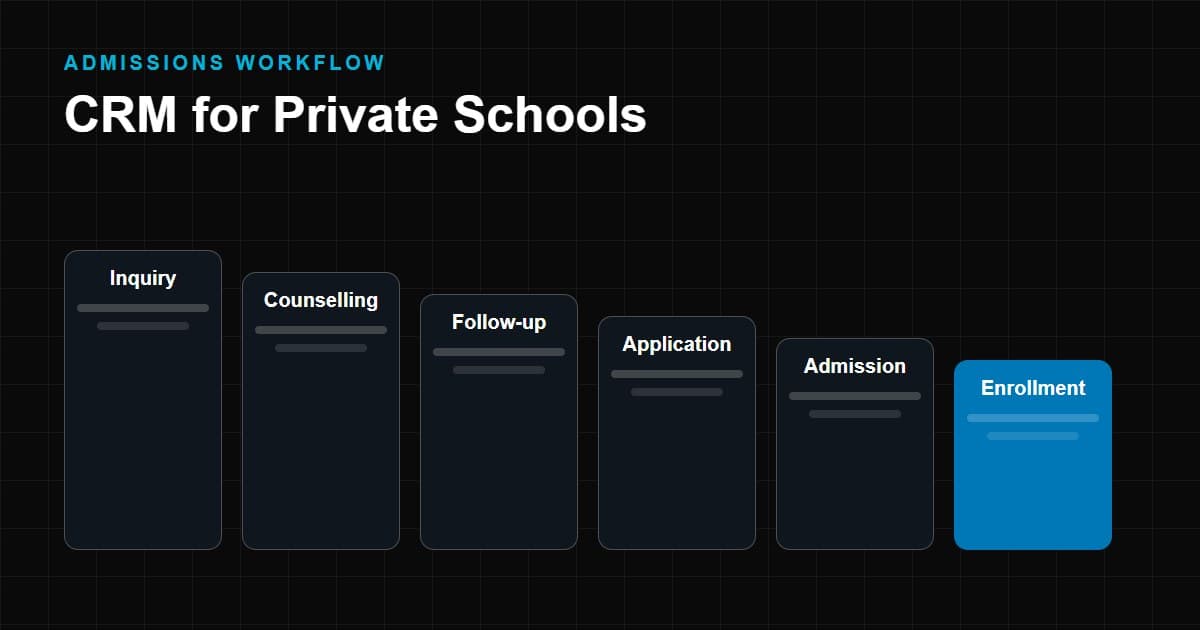
Yes, in most cases, and the reason is usually less about technology than about attention. A private school's admissions season is a stretch of weeks in which dozens or hundreds of families ask questions, compare options and quietly decide. The school that answers quickly, remembers what each family said and follows up at the right moment is at an advantage. A CRM for private schools exists to make that repeatable rather than dependent on one person's memory.
This article explains what a school CRM does, where private schools lose inquiries today, how the admission workflow maps onto a CRM, which features matter, how the needs of a single campus differ from a multi-campus group, and how to choose and introduce one. It is written for the people who run admissions and the people who fund it. For the wider category, see our education CRM complete guide.
What Is a CRM for Private Schools?
A CRM (customer relationship management) system is software that keeps a single record of every person you communicate with, the history of that communication, and what should happen next. In a private school, that means:
- Every inquiry from a family, whatever channel it arrived through.
- Every conversation: calls, visits, emails, messages and notes.
- Every application and its status.
- Every task: who calls whom, when, and about what.
- The outcome: admitted, enrolled, declined or lost, with a reason.
Ordinary CRMs are designed around sales deals. School CRMs are shaped by admissions: prospective students, parents, grade levels, academic years, counsellors and seat capacity. When people say school CRM, private school CRM or admissions CRM, they generally mean software configured around that model.
A CRM is not the same as your school management software. The management system handles enrolled students: timetables, attendance, grades, fees. The CRM handles the relationship before and during admission. We compare them in more detail below.
Why Private Schools Need Better Inquiry and Admission Management
Private schools rarely fail at admissions because of a lack of effort. They fail because effort is spread across tools and people. These are the patterns to look for in your own school.
Missed inquiries. A call comes in while the front desk is busy. A web form lands in a shared inbox that nobody owns. A message arrives on a Saturday. Each of these is a family that has just shown interest and heard nothing.
Delayed follow-ups. A visit goes well, and then the follow-up is pushed to the following week because other things happened. By then the family has visited two other schools.
Scattered data. One counsellor keeps notes in a notebook, another in a spreadsheet, the office uses a register, and the principal remembers a few parents personally. No one can see the whole picture.
Manual spreadsheets. They work for a small list and break as volume grows: different versions, overwritten rows, no reminders, no history.
Duplicate records. The same family appears several times under different spellings or contact details. Staff contact them more than once, or not at all because each thinks another has handled it.
No pipeline visibility. Management asks how many applications are in progress and where they are stuck. Answering takes a day of collating.
Inconsistent parent communication. What a family hears depends on who they spoke with. Some get prompt, warm follow-up; others get silence.
Poor reporting. Without clean data you cannot say which sources produce admissions, which counsellors follow up most reliably or where families drop out.
None of these require a large system to fix. They require one shared record, clear ownership and reminders.
How a CRM Works in a Private School
The simplest way to understand a school CRM is to follow one family through it.
Inquiry → Lead capture → Counselling → Follow-up → Application → Admission → Enrollment
- Inquiry. A parent contacts the school: a web form, a phone call, an event, a referral or a message.
- Lead capture. The CRM creates or updates a record. It notes the source, the child's intended grade, the parent's contact details and the date. If the family already exists, it links to the existing record instead of creating a duplicate.
- Counselling. The record is assigned to a counsellor, who is prompted to make first contact within an agreed time. Calls, visits and notes are logged.
- Follow-up. The CRM schedules reminders for next steps: campus tour, assessment, information pack, a conversation with the principal. Each step has an owner and a due date.
- Application. When the family applies, the record moves to the application stage and tracks documents, tests, interviews and decisions.
- Admission. Once the school offers a place and the family accepts, the record reflects it. Payment or deposit tracking may begin.
- Enrollment. The student's details are confirmed and, where applicable, passed to the school management system.
At each stage you can see how many families are there and how long they have been waiting. That is what a pipeline is: not a sales metaphor, but a picture of where each family is.
CRM Features Private Schools Should Look For
Rather than list every possible feature, here is what each capability should let you do in practice, and what to ask a vendor.
| # | Capability | What it should let you do | Question to ask |
|---|---|---|---|
| 1 | Lead and inquiry management | Capture inquiries from all channels into one list | Which channels connect automatically? |
| 2 | Admission pipeline | Move each family through your own stages | Can we rename and reorder stages? |
| 3 | Automated follow-ups | Create reminders and tasks when a stage changes | Can rules vary by grade or source? |
| 4 | Parent communication | Log and send messages to guardians | Are both parent and student records supported? |
| 5 | Student records | Store applicant details and documents | Can we add custom fields? |
| 6 | Counsellor management | Assign, reassign and balance workload | Can leads be assigned by rules? |
| 7 | Call tracking | Log calls and outcomes | Is there calling integration or manual logging? |
| 8 | Email and WhatsApp | Communicate from the record where supported | Which messaging channels are officially supported? |
| 9 | Application tracking | Follow documents, tests and decisions | Can we configure checklists per grade? |
| 10 | Payment and fee tracking | Track registration or admission payments | Does it integrate with our payment provider? |
| 11 | Reports and dashboards | See funnel, sources and counsellor activity | Can we build our own reports? |
| 12 | Role-based access | Limit who sees what | Can we restrict by campus or role? |
| 13 | Data import | Bring in existing spreadsheets | How does it handle errors and mapping? |
| 14 | Duplicate management | Detect and merge repeated records | Is detection automatic or manual? |
| 15 | Integrations | Connect website, school ERP or management system | Is there an open interface or only ready connectors? |
WhatsApp deserves a specific caution. Business messaging platforms have their own rules for opt-in, templates and approved usage, and features differ between vendors. Check exactly what a product supports today before relying on it in your process.
CRM vs Manual School Admission Management
The following table compares how common admission tasks are handled with paper and spreadsheets versus a CRM. It describes typical differences, not guaranteed outcomes.
| Everyday task | Manual approach | With a CRM |
|---|---|---|
| Recording a new inquiry | Written in a register or typed into a sheet, if remembered | Captured automatically or entered once on a standard form |
| Checking whether a family already inquired | Search multiple files | Duplicate check when the record is created |
| Deciding who calls whom today | Depends on whoever remembers | Task list per counsellor with due dates |
| Recalling what was discussed | Ask the counsellor | Open the record and read the history |
| Knowing how many applications are pending | Collate from several sources | Open the pipeline view |
| Covering for an absent counsellor | Hand over notes informally | Reassign records with history intact |
| Finding which source performs best | Manual tally, if at all | Source field on every record and a report |
| Handling a staff departure | Knowledge leaves with them | Records stay with the school |
| Complying with data requests | Search across files | Records in one place with access controls |
The advantage is not speed for its own sake. It is that the school's knowledge about each family belongs to the school, not to individual staff or files.
How CRM Helps School Admissions Teams
For the people doing the daily work, a CRM changes three things.
Clarity of priorities. Instead of deciding what to do next from memory, each counsellor sees a list: calls due today, families waiting for a reply, applications missing documents.
Continuity. Any team member can pick up a conversation because the history is in the record. When a family calls back, whoever answers can see what was said last.
Less repeated typing. Standard templates for emails and information packs, and information captured once, free staff to spend time on conversations rather than on administration.
Schools that also run online or hybrid programmes will find the lead-handling questions differ somewhat; our guide to CRM for online teaching institutes covers that side. Good admissions teams also use the notes field well: what the family is worried about, what they liked on the tour, who else they are considering. That is the material that makes follow-up feel personal rather than scripted.
How CRM Helps School Management
Principals and directors do not need to read individual records. They need to answer a few questions reliably.
- How many inquiries do we have this cycle, and from which sources?
- How many are still waiting for a first response?
- Where do families drop out: after the tour, after the application, after the offer?
- Which grades are filling and which need attention?
- How is each counsellor's follow-up work distributed?
- Is the marketing spend producing admissions or only inquiries?
A CRM makes these answerable from one screen. It also supports planning: with several admission cycles of clean data, the school can see typical timing and prepare staffing for peak periods, without relying on estimates borrowed from other institutions.
How CRM Improves Parent Communication
Parents judge a school by how it treats them before admission. A CRM supports consistent communication in practical ways:
- Speed and ownership. Every inquiry has an owner and a target response time.
- Consistency. Templates for standard messages, adjusted by the counsellor, so families receive accurate information regardless of who replies.
- Timing. Reminders for follow-up at sensible intervals after a visit, and before application deadlines.
- Preferences. Recording the parent's preferred channel and language, and honouring opt-outs.
- Context. Knowing that a sibling already attends, or that the family relocated recently, before the call starts.
Automation should support, not replace, human contact. Automated messages suit acknowledgements, reminders and document requests. A worried parent choosing a school deserves a person.
How CRM Supports Student Enrollment
Enrollment is where admissions ends and school operations begin, and a CRM can smooth the handover.
- Checklists show which documents, tests, fees or forms are outstanding before a place is confirmed.
- Payment tracking shows who has paid a registration or admission fee and who needs a reminder.
- Status clarity stops staff from asking a family for something they have already provided.
- Handover of confirmed details to the school management system reduces retyping and mistakes. Whether this happens automatically depends on the products involved.
For families not yet ready, the CRM keeps them visible. A family who declined this year may be worth contacting for next year's intake, provided you have their consent to be contacted.
CRM for Single-Campus vs Multi-Campus Schools
The right CRM setup is different depending on how many campuses you run.
| Consideration | Single-campus school | Multi-campus group |
|---|---|---|
| Users | A small admissions team | Teams at each campus plus central leadership |
| Access control | Simple roles | Campus-level restrictions and group-level views |
| Lead routing | Assign to a counsellor | Route by location, grade or capacity, with rules for overflow |
| Processes | One workflow | Shared core workflow with campus variations |
| Reporting | Funnel and source | Campus comparisons and group totals |
| Duplicate handling | Within one list | Across campuses, for families who inquire at more than one |
| Branding and templates | One set | Shared standards with campus-specific details |
| Implementation | Quick, single rollout | Phased rollout, often starting with a pilot campus |
| Governance | One decision-maker | Clear ownership for group standards |
Single-campus schools should resist over-engineering. A simple pipeline, clean data and reliable follow-up are the priorities. Multi-campus groups should spend more time on structure: permissions, routing and reporting hierarchy are much harder to change after launch.
How to Choose the Right CRM for a Private School
Match the tool to your circumstances rather than to a feature list.
- School size. A single small school needs less than a group with several thousand applicants a cycle.
- Number of inquiries. Volume determines how much automation and assignment you need.
- Admission cycle. A concentrated seasonal peak needs reliable reminders and the ability to scale usage temporarily. A rolling admission needs steady follow-up.
- Users. Count admissions staff, front desk, management and anyone who needs read-only access, since pricing often depends on it.
- Communication channels. List the channels families actually use: phone, email, WhatsApp, web chat. Verify support for each.
- Integrations. Consider your website, ad platforms, payment provider and school management system.
- Budget. Compare total cost over several years, including setup, training, per-user fees, messaging costs and support.
- Implementation. Ask what data migration involves, who configures the system and how long it takes.
- Support. Check hours, channels and languages for support, particularly during your admission peak.
- Reporting. See whether you can produce the reports management actually asks for, without a developer.
- Security and privacy. Ask where data is stored, who can access it and how access is logged. Children's data typically carries stricter obligations, and the applicable rules depend on your country. Seek advice from someone qualified in your jurisdiction.
Try before buying. Ask vendors to demonstrate your workflow with your own scenarios, not a generic demo, and involve the counsellors who will use it.
If your requirements are unusual, you may also want to compare against building your own. Our guide to custom CRM vs ready-made CRM covers that decision, and the education CRM complete guide explains the other categories you may run into.
Common CRM Mistakes Private Schools Should Avoid
- Buying before mapping your process. Software cannot fix an admissions process nobody has agreed on.
- Copying the spreadsheet. Moving a messy sheet into a CRM produces a messy CRM. Clean and structure the data first.
- Too many stages and fields. Every extra field is one more thing staff must fill in. Keep what you will use.
- No named owner. Someone must be responsible for configuration, standards and training.
- Skipping training. Staff who do not understand why the system helps them will default to their old habits.
- Over-automating. Families notice impersonal messages. Automate the routine, not the relationship.
- Ignoring consent. Record how contacts agreed to be contacted and respect preferences and opt-outs.
- Overlooking mobile use. Counsellors often work away from a desk during tours and events.
- Not measuring. Decide up front which reports you will review each week.
Implementation Checklist for Schools
Before you choose
- Write down the current admission process from inquiry to enrollment.
- List the sources of inquiries and the channels used to reply.
- Identify who will use the system and what each role needs to see.
- Decide which reports management needs.
- Note existing systems the CRM must work with.
During selection
- Shortlist tools and run a demo with your scenarios.
- Ask about data location, access controls and export.
- Confirm total cost over several years.
- Check references from schools of similar size.
Setup
- Define pipeline stages and what moves a record between them.
- Configure fields, roles and assignment rules.
- Clean and import existing data; resolve duplicates.
- Connect the website forms and other channels.
- Prepare templates for standard communications.
Launch
- Train counsellors and office staff with real records.
- Run the old and new process side by side briefly, then stop the old one.
- Set response-time targets and follow them.
After launch
- Review pipeline and source reports weekly during the cycle.
- Collect staff feedback and adjust.
- Review the setup after the admission cycle ends.
Conclusion
Private schools benefit from a CRM when it gives them one reliable record of every family, clear ownership of follow-up and honest visibility of the admission pipeline. It does not replace the counsellor's judgement or the principal's conversations; it makes sure those conversations happen at the right time. Choose a CRM for private schools based on your workflow, team and cycle, introduce it deliberately, and measure what it changes. Then extend it as your admissions process matures.